tp
Developer Guide
- Acknowledgements
- Design
- Implementation
- Appendix: Requirements
- Appendix: Instructions for Manual Testing
Acknowledgements
We would like to thank our TA Nigel Yeo, Prof Akshay and the CS2113 Team for their guidance.
Design
Architecture
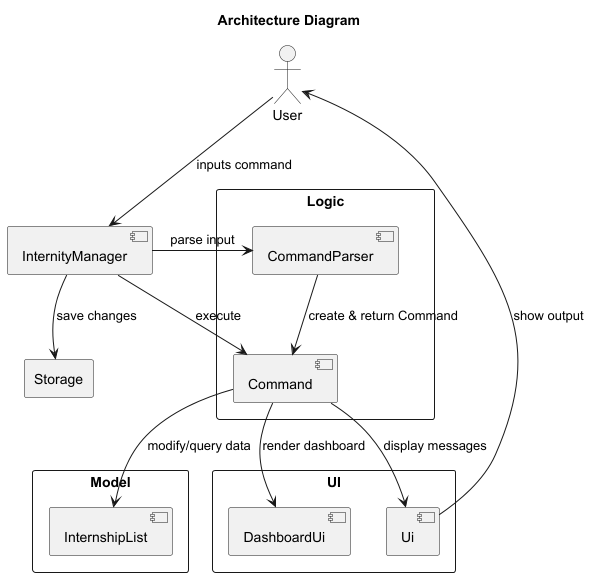
The Internity application adopts layered architecture where responsibilities are divided among UI, Logic, Model and Storage related components. It also follows the Command Pattern for handling user actions. This design separates concerns clearly, allowing for modular, maintainable and extensible code.
The Architecture Diagram below explains the high-level design of the Internity application.
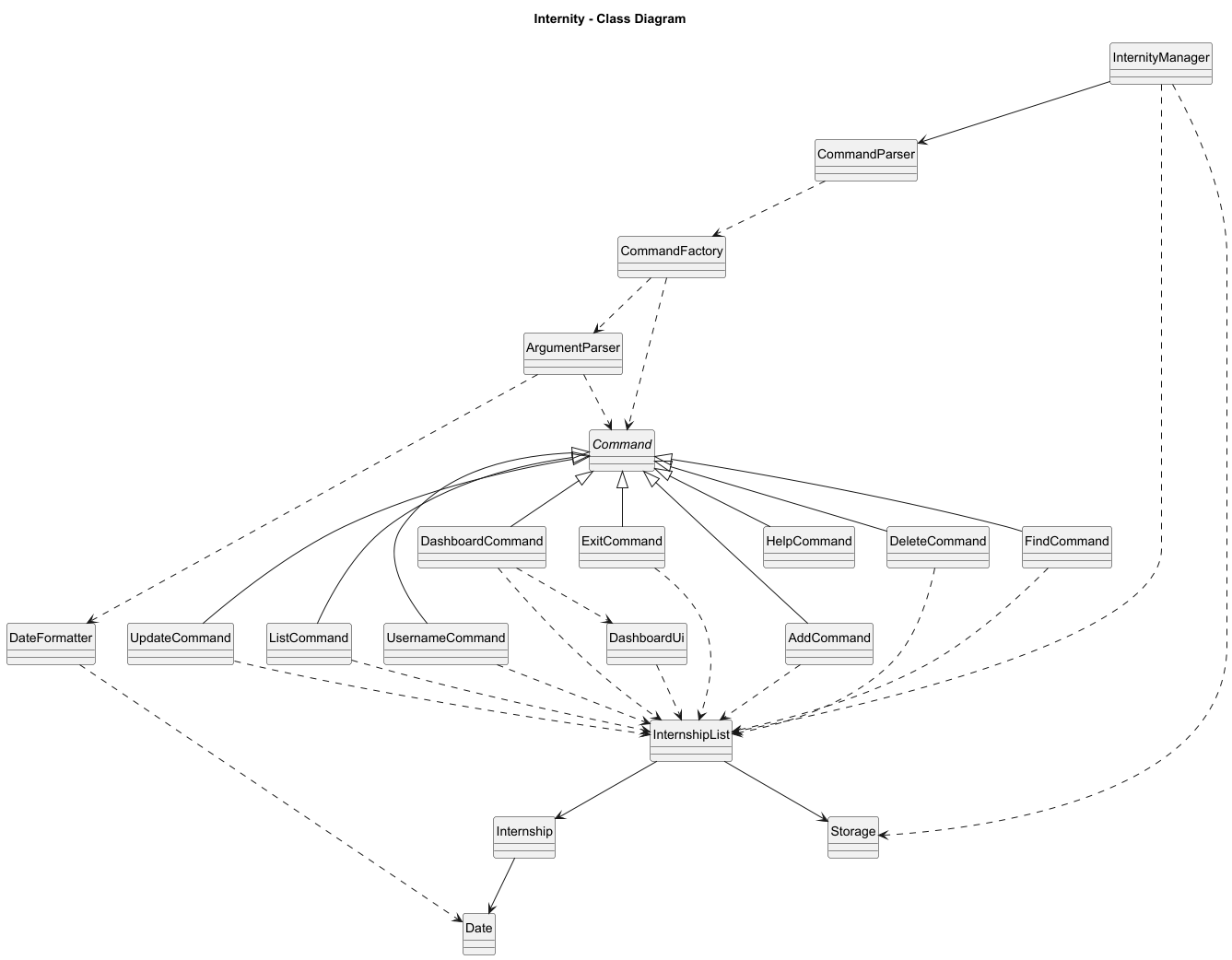
The diagram below shows a simplified Class Diagram of all of Internity’s classes and their relationships.
(Ui class omitted for simplification as most classes are dependent on it.)
Layers
- Controller
- Classes:
InternityManager - Responsibilities:
- Launches and shuts down the application.
- Receives input from the user and delegates parsing to the
Logiclayer. - Commands executed by
Logiclayer may modify theModelor trigger UI updates. - It also handles reading from and writing to the
Storagelayer. - Simplifies interactions between all layers and maintains a clear separation of concerns.
- Classes:
- UI (User Interface)
- Classes:
Ui,DashboardUi - Responsibilities:
- Handles all user-facing output (printing, dashboards, etc.).
- Does not perform any logic or state changes.
- Displays information passed from the
LogicorModellayers in a user-friendly format. - Invoked by Commands to show feedback or results.
- Classes:
- Logic
- Classes:
CommandParser,CommandFactory,ArgumentParser,Commandsubclasses - Responsibilities:
- Acts as the intermediary between user input and
Modeloperations. - Parses and validates user commands.
- Constructs the appropriate
Commandobject through theCommandFactory. - Executes commands, which modify the
Modelor trigger theUIto display information.
- Acts as the intermediary between user input and
- Classes:
- Model
- Classes:
InternshipList,Internship,Date,Status - Responsibilities:
- Stores internship data
- Provides operations like adding, deleting, updating, finding or listing internships.
- Completely independent of UI and input logic.
- Classes:
- Storage
- Classes:
Storage - Responsibilities:
- Reads and writes internship data to persistent storage (e.g., file system).
- Keeps data consistent between sessions.
- Used by InternityManager to save or load application state.
- Classes:
User Interaction
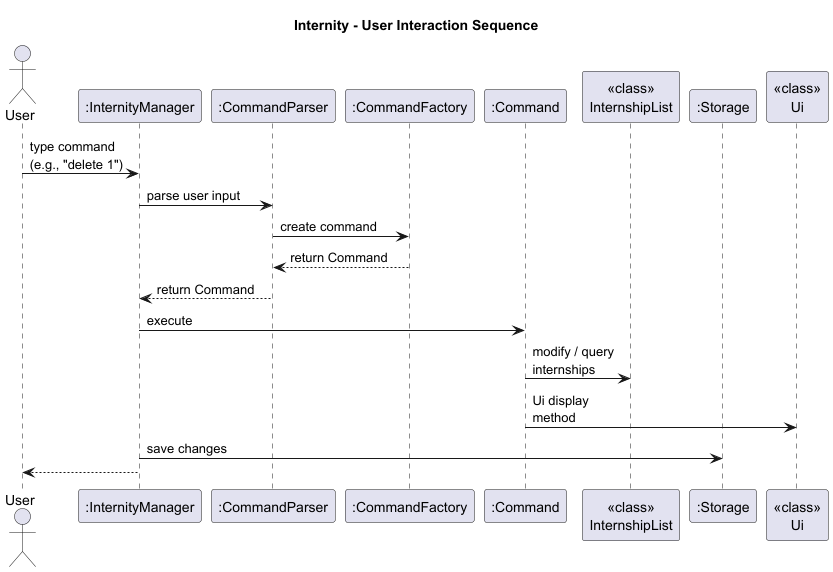
The Sequence Diagram below shows a simplified version of how the components interact with each other when the user issues the command
delete 1.
UI Component
Overview
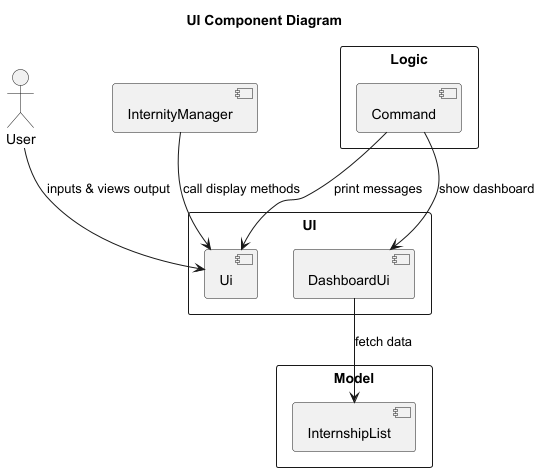
The UI component is responsible for all interactions between the user and the application. It displays messages, prompts, and formatted lists in the command-line interface (CLI), and ensures that feedback from executed commands is presented clearly.
The API of this component is specified in the Ui.java class
and the DashboardUi.java.
How it Works
- The
InternityManagerhandles all user input through aScanner. When a command is executed, it delegates output responsibilities to theUiclass. - The
Uicomponent formats and prints the messages or internship data to the console. For example:Ui.printAddInternship()displays confirmation for a newly added internship.Ui.printFindInternship()displays results in a neat, column-aligned format.
- For specialised displays such as the dashboard, the
DashboardUiclass is used.
Design Considerations
- Static methods
- The
Uiclass methods are static to ensure simplicity and easy access across commands without requiring instantiation.
- The
- Loose coupling
- The UI does not directly modify model or logic components.
- It only displays results based on data passed to it.
Logic Component
Overview
The Logic component is responsible for:
- Parsing user input commands.
- Creating the appropriate
Commandobject. - Executing that command to modify the Model or interact with the UI.
Chosen Approach
This component follows the Command Pattern, which decouples the user input parsing from the execution of commands.
Each command is represented as a subclass of the abstract Command class, encapsulating its execution logic. This
allows new commands to be easily added without modifying the core parsing or execution workflow.
Class Diagram
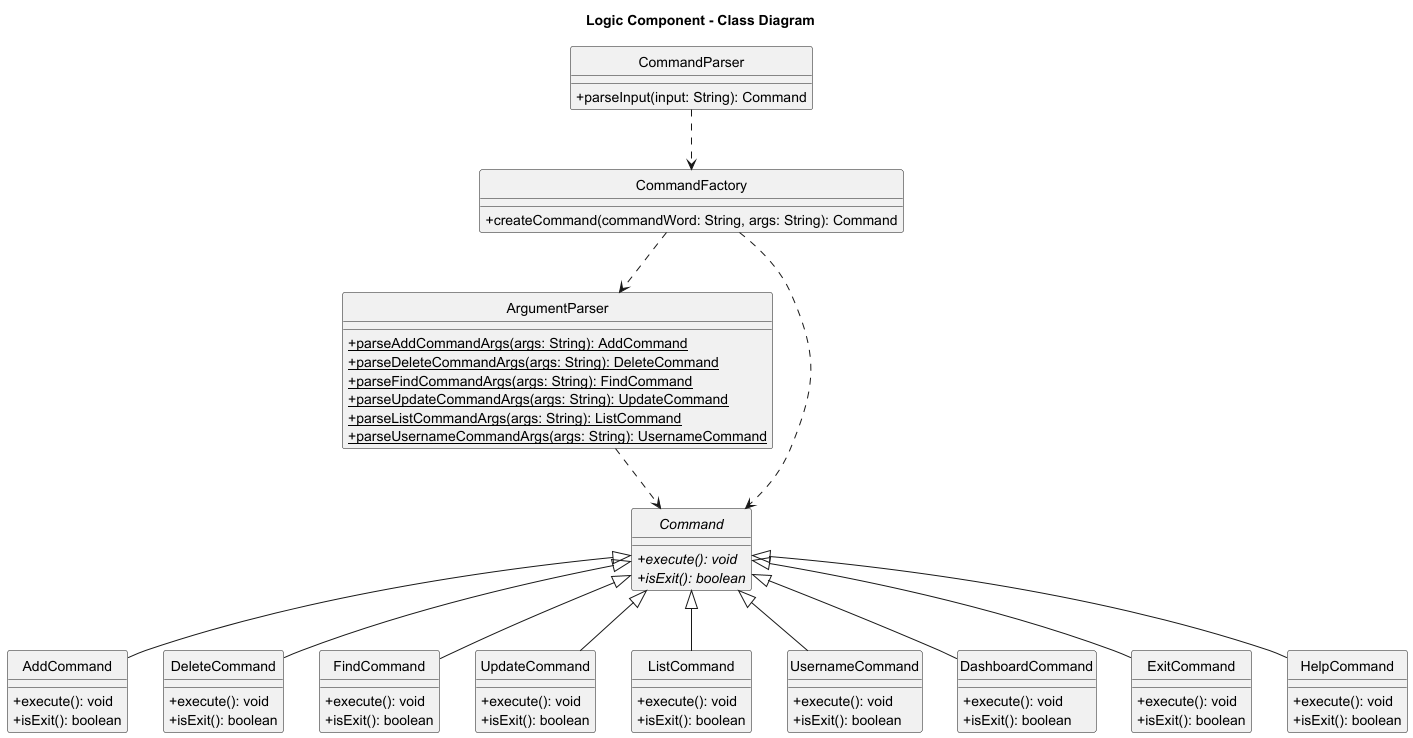
The class diagram above shows the main classes involved in parsing, creating, and executing commands.
- CommandParser is responsible for validating and splitting the input.
- CommandFactory creates the appropriate Command object.
- ArgumentParser is a static utility class used to parse arguments for commands that require them.
- All Command subclasses implement the execute() method, following the Command Pattern.
How it Works
- User input (e.g.
add company/Google role/Software Engineer deadline/17-09-2025 pay/7000) is received by CommandParser. - The
CommandParser:- Validates that the input is not empty or malformed.
- Splits the input into a command keyword and arguments.
- Passes them into the
CommandFactory.
- The
CommandFactory:- Matches the keyword to a corresponding
Commandsubclass (e.g.AddCommand). - Uses the
ArgumentParserto interpret argument strings. - Returns a fully constructed
Commandobject.
- Matches the keyword to a corresponding
- The
Commandobject executes its logic (e.g. adds a new internship toInternshipList). - Finally, the result of the execution is printed to the console via the
Ui.
Sequence Diagram
The following sequence diagram illustrates how the Logic Component processes an input command:
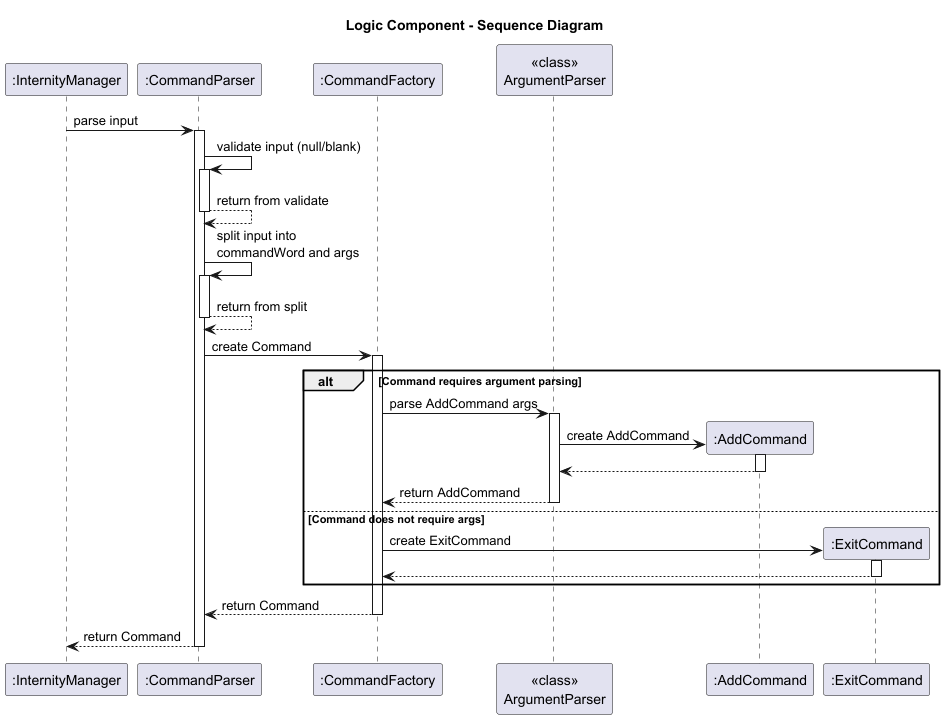
Explaining Commands with and without arguments
- Commands that require arguments
add,delete,find,list,update,username- These commands need extra information to execute correctly:
addneeds company, role, deadline and pay.updateneeds an index and fields to update.findneeds a search keyword.
- Commands that do not require arguments
dashboard,exit,help- These commands operate independently of data supplied by the user.
CommandFactorydirectly constructs the correspondingCommandobject (e.g.ExitCommandorDashboardCommand) without invokingArgumentParser.
This distinction is represented in the above sequence diagram’s alt block, showing the two conditional flows:
- Top path (commands requiring arguments) -> parsed via
ArgumentParser, then instantiated. - Bottom path (commands not requiring arguments) -> instantiated directly.
Model Component
API: internity.core
Overview
The Model component:
- stores internship data i.e. all
Internshipobjects in anInternshipListobject - provides operations to manipulate that data e.g.
add,delete,update,find,listinternships - does not depend on the other three components (i.e.
UI,Logic,Storage)
Class Diagram
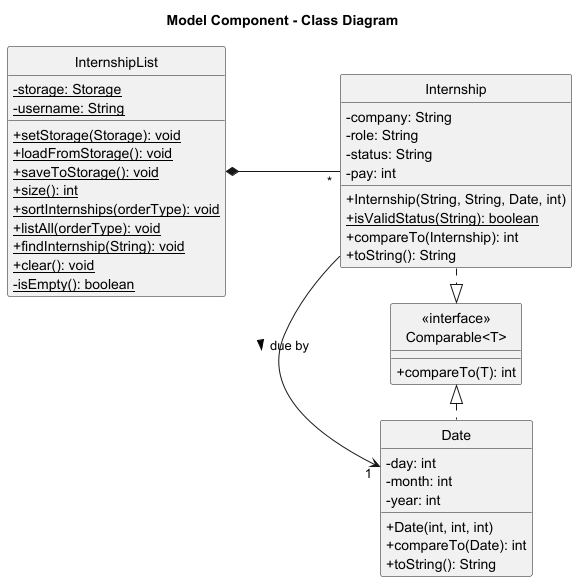
The class diagram above shows the main classes involved in manipulating Internship objects.
- InternshipList is a class that manages a static ArrayList of Internship objects. It provides methods to add, delete, find, list, retrieve, sort and update internships.
- Internship represents a single internship application with the attributes company, role, deadline, pay and status.
- Date encapsulates date-related functionality, including parsing and formatting dates in dd-MM-yyyy format.
- Status is a String representing the possible statuses of an internship application (Pending, Applied, Interview, Offer, Rejected).
Getters and setters have been omitted from Class Diagram for clarity.
Sequence Diagram
The following sequence diagram illustrates how the Model Component processes an AddCommand:
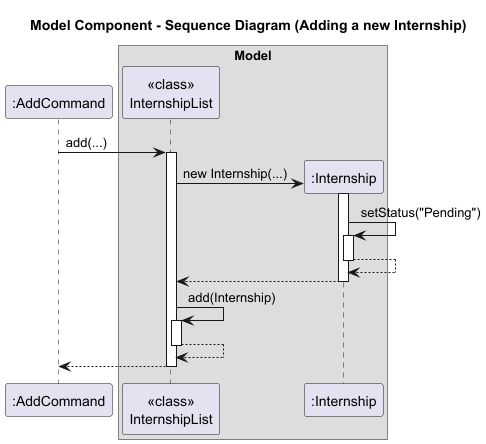
The sequence diagram above shows how the AddCommand interacts with the InternshipList to add a new internship.
- The
InternshipList.add()method is called with the necessary parameters (company, role, deadline, pay). InternshipListcreates a newInternshipobject with those parameters.InternshipListcallsadd()to add the new internship to the static ArrayList of internships.
The following object diagram illustrates the objects after an internship has been added using the AddCommand.
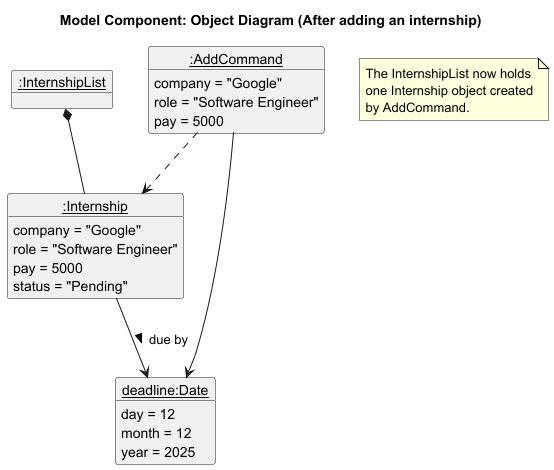
After executing the AddCommand, a new Internship object is created and added to the InternshipList.
The Internship object contains all relevant attributes, including company, role, pay, status, and a deadline
that points to a separate Date object representing the day, month and year of the application deadline.
The AddCommand maintains a reference to both the newly created Internship and its associated Date during execution.
The object diagram illustrates these relationships, showing that InternshipList now contains the new Internship, and
that deadline is a distinct object referenced by Internship.
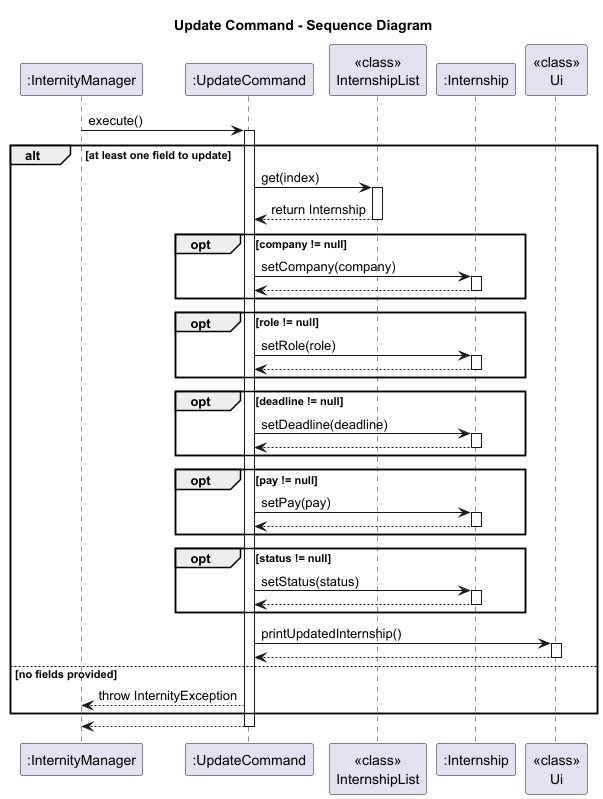
The following sequence diagram illustrates how the Model Component processes an Update command:
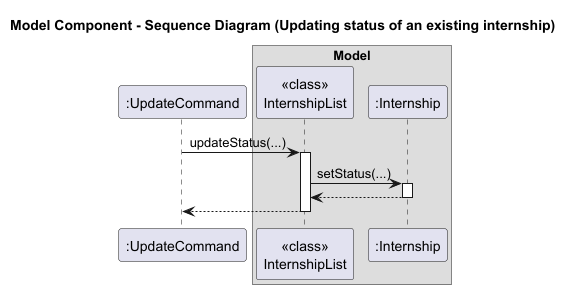
The sequence diagram above shows how the UpdateCommand interacts with the InternshipList to update an existing internship.
- The
InternshipList.update()method is called with the index of the internship to update and the new status. InternshipListretrieves the existingInternshipobject at that index.InternshipListcalls thesetStatus()method on theInternshipobject to update its status.
Storage Component
API: Storage.java
The Storage component:
- can save internship data in a pipe-delimited text format, and read it back into corresponding objects.
- depends on classes in the
internity.corepackage (specificallyInternshipandInternshipList) to load and save internship data. - automatically creates the data directory and file if they don’t exist.
- handles corrupted data gracefully by skipping invalid entries and logging warnings instead of crashing the application.
The following class diagram shows the Storage component and its relationships:
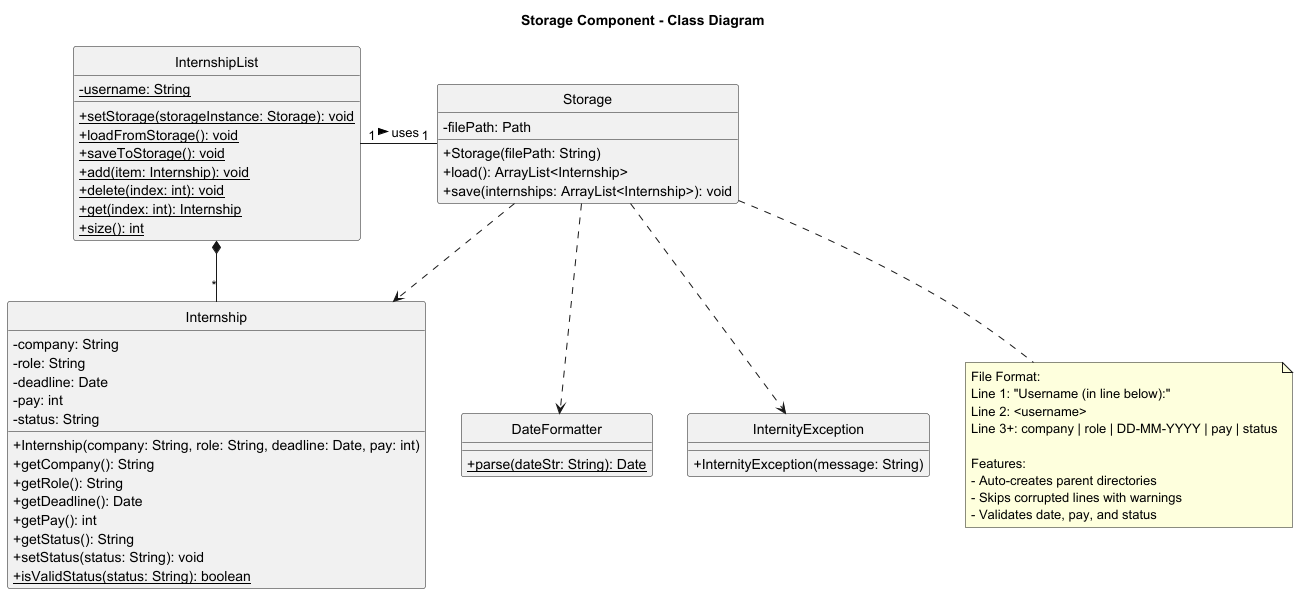
The class diagram illustrates:
- Storage manages file I/O operations and uses helper methods for parsing and formatting
- InternshipList acts as a facade, coordinating between Storage and the in-memory list
- Internship and Date are the data models that get serialised/deserialised
- DateFormatter provides date parsing utilities used during the load operation
- InternityException is thrown when storage operations encounter errors
Implementation
Add feature
API: AddCommand.java
The add mechanism allows users to record new internship entries in their tracking list. This feature ensures users can maintain a comprehensive and organised list of upcoming internship opportunities, along with key details such as company, role, deadline and pay.
Implementation
The add mechanism is implemented by the AddCommand class, which extends the abstract Command class. It encapsulates the logic for validating user input, constructing an Internship object and inserting it into the internship list.
Key components involved:
AddCommand— Encapsulates the creation and insertion of a new internship entryArgumentParser.parseAddCommandArgs()— Parses and validates raw user input into individual internship fieldsInternshipList.add()— Inserts the constructed internship into the static internship listUi.printAddInternship()— Displays a confirmation message with internship details
How the add operation works
The following sequence illustrates how the add command is processed from user input to data persistence.
Step 1. The user launches the application and executes a command such as:
add company/Google role/Software Engineer deadline/17-09-2025 pay/7000
- Note that by default, the status is set to Pending when a new internship is added. Users may use the
updatecommand to change the status.
Step 2. The CommandParser splits the input into command word "add" and the argument string
"company/Google role/Software Engineer deadline/17-09-2025 pay/7000".
Step 3. The CommandFactory delegates parsing to ArgumentParser.parseAddCommandArgs(args), which performs detailed extraction and validation of all fields.
Argument Parsing Logic
The ArgumentParser.parseAddCommandArgs() method converts a raw argument string into a valid AddCommand instance.
This process ensures strict input integrity, correct field representation and data consistency.
Parsing process:
1. Input Validation
- Checks if the argument string is null or blank.
- Throws
InternityException.invalidAddCommand()if the check fails. - Assertion ensures arguments remain non-blank after validation.
2. Splitting Fields
- Splits the input string using the predefined regular expression pattern
PARSE_LOGIC_ADD, which employs a lookahead to separate fields at whitespace positions that precede one of the expected prefixes (company/,role/,deadline/, orpay/). - Expects exactly four parts each prefixed with
company/,role/,deadline/andpay/, and in this exact order. - If the number of fields is not four, throws
InternityException.invalidAddCommand(). - If any field is missing or placed in the wrong order, throws
InternityException.noFieldForAdd()specifying that field.
3. Extracting Values
- For each field, removes the prefix and trims whitespace.
- Example:
company/Google → "Google" role/Software Engineer → "Software Engineer" deadline/17-09-2025 → "17-09-2025" pay/7000 → "7000" - The extracted strings are stored as:
company,role,deadlineString,payString.
4. Field Lines and Emptiness Checks
- Ensures each field is non-empty, throwing
InternityException.emptyField()otherwise. - Checks that:
- company.length() ≤
Ui.COMPANY_MAXLEN - role.length() ≤
Ui.ROLE_MAXLEN - If violated, throws
InternityException.exceedFieldLength().
- company.length() ≤
5. Data Conversion
- Parses
deadlineStringinto aDateobject viaDateFormatter.parse(). - Parses
payStringinto an integer usingInteger.parseInt().- If parsing fails because
payStringcontains non-numerical character(s), is negative or exceedsInteger.MAX_VALUE, throwsInternityException.invalidPayFormat().
- If parsing fails because
6. Command Construction
- Upon successful validation, a new
AddCommandinstance is created:return new AddCommand(company, role, deadline, pay);
At any failure stage: The issue is logged an appropriate InternityException is thrown to provide clear user feedback.
Command Execution Flow
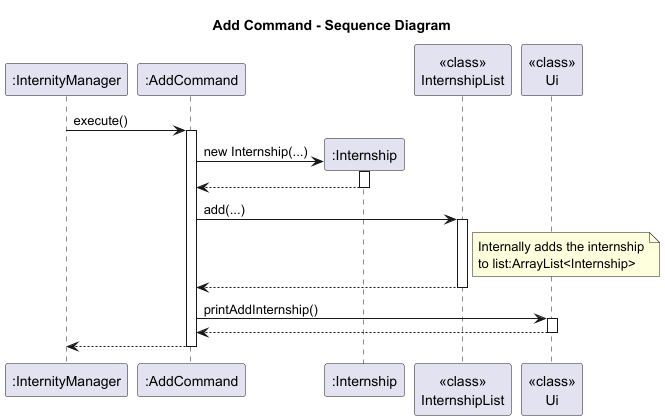
Step 4. When InternityManager calls AddCommand.execute():
- A new
Internshipobject is created using the parsed details. - The
InternshipList.add(internship)method adds the internship to the global static list. - The
Ui.printAddInternship()method displays a formatted confirmation message to the user.
Output:Added this internship: Company: Google Role: Software Engineer Deadline: 17-09-2025 Pay: 7000 Status: Pending Now you have 1 internship(s) in the list.
Step 5. After execution, InternityManager triggers InternshipList.saveToStorage(), which internally calls Storage.save() to persist the updated internship list to disk.
Example Walkthrough
| Step | Component | Action |
|---|---|---|
| 1 | User | Inputs add company/Google role/Software Engineer deadline/17-09-2025 pay/7000 |
| 2 | CommandParser | Separates command and arguments |
| 3 | ArgumentParser | Parses and validates all four fields |
| 4 | AddCommand | Creates Internship object and calls InternshipList.add() |
| 5 | Ui | Displays success message |
The following sequence diagram illustrates the complete add operation flow:
Design considerations
Aspect: Inputting parameters by prefix
- Alternative 1 (current choice): Users provide prefix in words:
company/,role/,deadline/,pay/- Pros: Highly readable and self-explanatory for new users.
- Pros: Reduces ambiguity between parameters as each prefix clearly indicates its purpose.
- Pros: Consistent with other natural-language command formats in the application.
- Cons: Slightly longer to type compared to abbreviated prefixes.
- Cons: Parsing logic requires string comparisons with longer literals, adding minor verbosity.
- Alternative 2: Users provide prefix in short form:
c/,r/,d/,p/- Pros: Faster for experienced users to type.
- Pros: Compact input format improves command-line efficiency.
- Cons: Less intuitive for beginners unfamiliar with shorthand notation.
- Cons: Higher likelihood of user input errors due to short and similar-looking prefixes.
Aspect: Status field
- Alternative 1 (current choice): Default the internship status to Pending when adding.
- Pros: Reflects the most common initial state of an internship application.
- Pros: Reduces the number of parameters users must input when adding an internship, improving usability.
- Pros: Users can update the status later using the
updatecommand. - Cons: Users cannot set a different status at the time of creation; must perform an additional step to update.
- Alternative 2: Require users to input the status explicitly when adding an internship.
- Pros: Provides complete control over the status at creation time.
- Cons: Increases user effort for the common case of adding a pending internship.
- Cons: May cause confusion or errors if users are unfamiliar with valid status options.
Aspect: Order of parameters
- Alternative 1 (current choice): Fixed order: company, role, deadline, then pay.
- Pros: Simplifies parsing logic and validation, so no need for dynamic prefix searching.
- Pros: Guarantees consistent argument positions, providing a consistent format and reducing ambiguity for users.
- Pros: Easier to implement and debug, with predictable input format.
- Cons: Users need to follow the exact field order.
- Cons: Any deviation from the expected sequence causes command rejection.
- Alternative 2: Flexible order.
- Pros: More user-friendly as fields can be entered in any sequence.
- Pros: Robust against user typing variations.
- Cons: Requires more complex parsing logic to detect and map prefixes dynamically.
- Cons: Increases risk of malformed input if prefixes are missing or repeated.
- Cons: Harder to maintain and debug due to variable argument positions.
Aspect: Allowing duplicate internship entries
Rationale:
- Since users may apply to the same company for different positions or different application cycles, allowing duplicates supports flexibility.
- It aligns with the goal of Internity as a personal tracking tool rather than a strict database system.
Aspect: Allowing any deadline for internship entries
Rationale:
- Users may want to record past, current, or future internship opportunities, so restricting deadlines could reduce usability.
- Flexibility in deadlines ensures that the system remains a personal organisational tool rather than enforcing business rules that may not apply to all users.
Update feature
API: UpdateCommand.java
The update mechanism lets users modify one or more fields of an existing internship entry. It keeps the list accurate as applications evolve, without the need for users to re-enter the whole record.
Implementation
UpdateCommand extends the abstract Command class. Users specify a 1-based index in the CLI, which is converted to a 0-based index during parsing. Any subset of fields can be provided. Only non-null fields are applied.
Key components involved
UpdateCommandEncapsulates the multi-field update with guarded calls for each optional field and a final success message.ArgumentParser.parseUpdateCommandArgs()Parsesupdate INDEX [company/...] [role/...] [deadline/...] [pay/...] [status/...], converts 1-based index to 0-based, validates tags and formats, constructsUpdateCommand.InternshipList.updateCompany()Sets company after index bounds check.InternshipList.updateRole()Sets role after index bounds check.InternshipList.updateDeadline()Sets deadline after index bounds check.InternshipList.updatePay()Sets pay after index bounds check and non-negative parsing in the parser.InternshipList.updateStatus()Validates and normalizes status, then sets it after index bounds check.Ui.printUpdateInternship()Confirms a successful update to the user.
How the Update Operation Works
Given below is an example usage scenario and how the update mechanism behaves at each step.
- Step 1. The user launches the application with a populated
InternshipList. The user executes:update 1 company/Google role/Software Engineer pay/9000 -
Step 2. Parsing input
CommandParserreceives the input and splits it into command wordupdateand the remaining arguments. -
Step 3. Creating the command
CommandFactorydelegates toArgumentParser.parseUpdateCommandArgs(...), which:- Splits the arguments into the index token and a tagged fields segment.
- Converts the 1-based index to 0-based.
- Scans tagged parts for
company/,role/,deadline/,pay/,status/using the predefined regular expression patternPARSE_LOGIC_UPDATE. - Parses types and validates formats.
deadline/is parsed withDateFormatter.parse(...).pay/is parsed as a non-negative integer.status/must be non-empty and is later normalized byInternshipList.updateStatus.
- Ensures at least one update field is present.
- Constructs and returns:
new UpdateCommand(index, company, role, deadline, pay, status)
-
Step 4. Executing the command
InternityManagercallsUpdateCommand.execute(), which:- Initialises
isUpdated = false. - For each non-null field, calls the corresponding
InternshipList.updateX(...).
Each update method checks index bounds and applies the new value.
updateStatusadditionally validates and canonicalizes the status string. - If no fields were provided, throws
InternityExceptionwith a clear message. - On success, calls
Ui.printUpdateInternship()to acknowledge the update.
- Initialises
Error Handling
- Invalid format for
updatearguments →ArgumentParser.invalidUpdateFormat() - Missing tagged fields →
InternityException.noUpdateFieldsProvided() - Invalid index token →
InternityException.invalidIndexForUpdate() - Unknown tag →
InternityException.unknownUpdateField(...) - Invalid
pay→InternityException.invalidPayFormat() - Out of bounds index when applying updates →
InternshipList.updateXthrowsInternityException.invalidInternshipIndex() - Invalid or empty
status→InternityException.invalidStatus(...)orInternityException.emptyField("status/")
Example Commands
update 3 status/Interviewing             # Update only status
update 2 company/Apple role/ML Engineer  # Update company and role
update 4 deadline/15-12-2025 pay/8500    # Update deadline and pay
update 1                                 # Invalid - no fields
update status/Accepted                   # Invalid - no internship index
Design Considerations
- Fields not provided by the user are ignored, so updates can be partial and focused.
- Validation is split across parsing and model methods for clear responsibility.
- Success messaging is centralised in
Uifor consistent output formatting.
Delete feature
API: DeleteCommand.java
The delete mechanism allows users to remove internship entries from their tracking list. This feature is essential for maintaining an up-to-date list of relevant internship applications by removing entries that are no longer needed.
Implementation
The delete mechanism is facilitated by DeleteCommand, which extends the abstract Command class. It stores an index field internally as a 0-based integer, although users interact with 1-based indices for a more natural experience.
Key components involved:
DeleteCommand- Encapsulates the delete operation with validation and execution logicArgumentParser.parseDeleteCommandArgs()- Converts user input to a 0-based indexInternshipList.delete()- Removes the internship from the static list with bounds checkingInternshipList.get()- Retrieves internship details before deletion for user feedbackStorage.save()- Automatically persists changes after successful deletion
How the delete operation works
Given below is an example usage scenario and how the delete mechanism behaves at each step.
Step 1. The user launches the application and the InternshipList contains 3 internships. The user executes delete 2 to delete the 2nd internship in the list.
Step 2. The CommandParser validates the input and splits it into command word "delete" and arguments "2".
Step 3. The CommandFactory delegates to ArgumentParser.parseDeleteCommandArgs("2"), which:
- Parses
"2"as an integer - Converts the 1-based index (2) to 0-based index (1)
- Creates and returns a new
DeleteCommand(1)
Step 4. InternityManager calls DeleteCommand.execute(), which:
- Calls
InternshipList.get(1)to retrieve the internship details (for displaying to the user) - Calls
InternshipList.delete(1)to remove the internship from the list- This method validates that the index is within bounds before removal
- Calls
InternshipList.size()to get the updated list size - Calls
Ui.printRemoveInternship()to display a confirmation message
Step 5. After the command completes, InternityManager automatically calls InternshipList.saveToStorage(), which in turn calls Storage.save() to persist the changes to disk.
The following sequence diagram illustrates the complete delete operation flow:
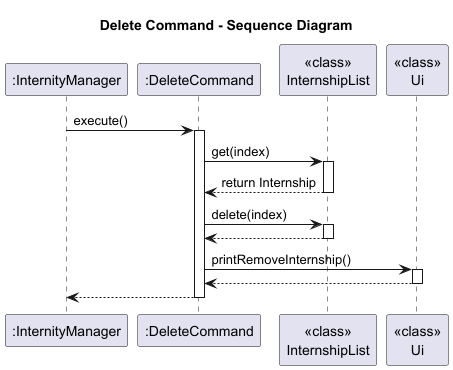
The sequence diagram shows how the delete command flows through multiple layers:
- Input Layer: User input is received by
InternityManager - Parsing Layer:
CommandParserandCommandFactorywork withArgumentParserto create the command - Execution Layer:
DeleteCommandinteracts withInternshipListandUi - Persistence Layer: Changes are automatically saved via
Storage
List feature
API: ListCommand.java
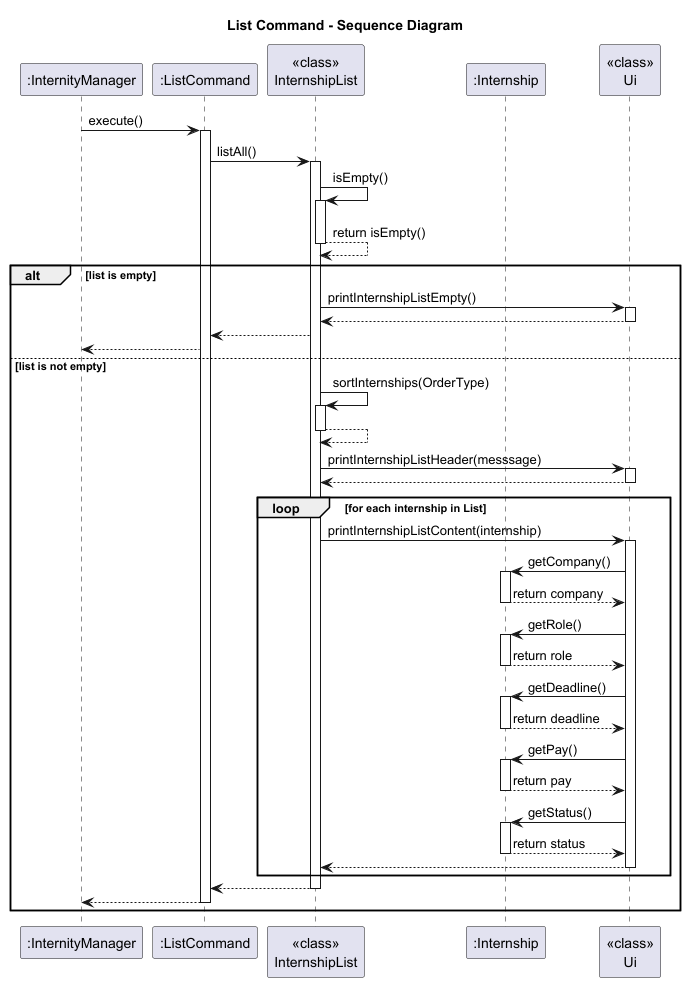
The list mechanism is implemented by the ListCommand class, which allows users to view all internships in their list.
Below is the sequence diagram for a common usage of the list feature:
Implementation
ListCommandaccesses theInternshipList, which contains theArrayList<Internship>of all stored internships.- If
sort/ascis specified,InternshipList.sortInternships(order)returns a newArrayListcopy sorted by deadline in ascending order. The original list is not modified. - If
sort/descis specified,InternshipList.sortInternships(order)returns a newArrayListcopy sorted by deadline in descending order. The original list is not modified. - If no sort option is specified, the internships are listed in the order they were added, after the last sort.
- The internship list is iterated through and each internship’s details are printed using
Ui.printList().
Design considerations
Aspect: Index base convention
- Alternative 1 (current choice): Users provide 1-based indices, converted to 0-based internally in
ArgumentParser.- Pros: More intuitive for users who see numbered lists starting from 1 in the UI
- Pros: Follows common conventions in user-facing applications
- Cons: Requires conversion logic and careful management of the conversion point to avoid off-by-one errors
- Cons: Developers must be careful to use the correct index type throughout the codebase
- Alternative 2: Use 0-based indices throughout, including in user-facing output.
- Pros: Simpler implementation with no conversion needed
- Pros: Consistent with Java’s ArrayList indexing
- Cons: Less intuitive for users unfamiliar with programming conventions
- Cons: May lead to user confusion and errors when entering indices
Aspect: When to retrieve internship details
- Alternative 1 (current choice): Retrieve internship details before deletion.
- Pros: Allows displaying specific internship information (company, role) in the success message
- Pros: Better user experience with more informative feedback
- Cons: Requires an additional
get()call before deletion
- Alternative 2: Only validate index, delete, and show generic success message.
- Pros: Simpler implementation with fewer method calls
- Cons: Less informative user feedback
- Cons: User cannot verify which internship was actually deleted
Aspect: Index validation location
- Alternative 1 (current choice): Perform bounds checking in
InternshipList.delete()andInternshipList.get().- Pros: Centralised validation logic in the model layer
- Pros: Ensures all access to the list is safe, regardless of caller
- Pros: Follows encapsulation principles
- Cons: May result in duplicate checks if both
get()anddelete()are called
- Alternative 2: Validate index only in
ArgumentParserbefore creatingDeleteCommand.- Pros: Early validation could provide faster feedback
- Cons: Violates encapsulation - the model layer should protect its own invariants
Find feature
API: FindCommand.java
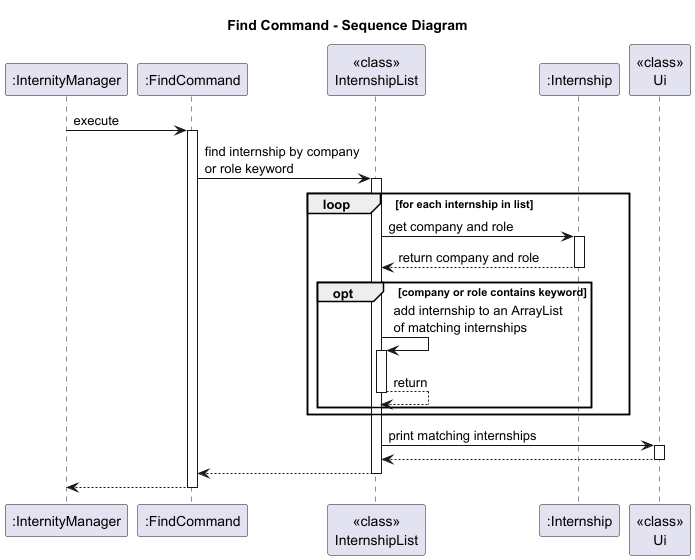
The find mechanism is implemented by the FindCommand class, which allows users to search for internships based on a
keyword that matches either the company name or the role of the internship.
The FindCommand class extends Command and consists of the following key components and operations:
- FindCommand.execute() - Executes the command by searching for internships that match the provided keyword. The search looks for matching company or role names.
Class and Method Breakdown
1. FindCommand Constructor
- Purpose: Initialises a
FindCommandobject with a given keyword. - Signature:
public FindCommand(String keyword); - Parameters:
keyword: The keyword to search for in the company or role fields of the internships.
2. FindCommand.execute()
- Purpose: Executes the find command, which triggers a search for internships matching the keyword.
- Signature:
@Override public void execute() throws InternityException; - Steps:
- Logs the command execution start.
- Calls
InternshipList.findInternship(keyword)to filter and search through the list of internships. - Logs the success of the operation.
3. InternshipList.findInternship()
- Purpose: Filters and returns internships whose company or role contains the given keyword, case-insensitively.
- Signature:
public static void findInternship(String keyword); - Parameters:
keyword: The string to search for in the company or role names of internships.
- Implementation:
- Internships are filtered using a stream to check if the keyword exists in either the company name or the role.
- The filter is case-insensitive (
keyword.toLowerCase()). - If no internships match the keyword, a message is printed: “No internships with this company or role found.”
- If matches are found, the results are passed to the
Ui.printFindInternship()method for display.
Example Usage Scenario
Step 1: The user launches the application and executes a find command by typing find Google.
Step 2: The CommandParser parses the input, extracting the command word find and the argument Google.
Step 3: The CommandFactory creates a FindCommand with the keyword Google.
Step 4: The FindCommand.execute() method is called, triggering the InternshipList.findInternship() method.
Step 5: findInternship() filters the internships, looking for the keyword in both the company and role fields.
If any matches are found, they are displayed through the UI.
Step 6: If no matches are found, the user sees the message printed in the UI: “No internships with this company or role found.”
Internals and Key Functions
-
Keyword Matching: The keyword is matched against both the company and role fields of each internship in a case-insensitive manner using the
toLowerCase()method. -
Logging: The command execution is logged at the start and end, using the
Loggerclass to track the command’s lifecycle. -
UI Handling: When matching internships are found, they are passed to the
Ui.printFindInternship()method for display. The UI is responsible for presenting the search results to the user.
Example Interaction
- User Input:
find Google - Expected Output:
  These are the matching internships in your list:
  _____________________________________________________________________________________________________________
  No. Company                        Role                           Deadline        Pay        Status
  _____________________________________________________________________________________________________________
    1 Google                         Software Engineer              17-09-2025      120000     Pending
    2 Alphabet                       Googleerrr                     17-09-2025      120000     Pending
  _____________________________________________________________________________________________________________
If no internships match:
No internships with this company or role found.
Edge Cases and Considerations
-
Case Insensitivity: The search is case-insensitive, so
find google,find GOOGLE, orfind GoOgLewould all match the same internships. -
Empty or Invalid Keyword: If an empty string is provided as the keyword, the Ui will print “Invalid find command. Usage: find KEYWORD”
-
Performance: The search mechanism uses a stream-based filter on the internship list, which is efficient for moderate-sized datasets but may require optimisation for larger datasets.
Design Considerations
Aspect: Filtering criteria
- Alternative 1 (current choice): Match results if the keyword appears in either the
companyorrolefield.- Pros: Provides broader and more flexible search results as users can find internships even if they only remember the company or the role.
- Pros: Simple and efficient to implement using basic string matching.
- Pros: Reduces the need for users to specify which field to search, improving ease of use.
- Cons: May return more results than intended if the keyword appears in both fields across many entries.
- Cons: Cannot distinguish whether a match came from the company name or the role field.
- Alternative 2: Require users to specify the search field explicitly using prefixes (e.g.
find company/Googleorfind role/Engineer).- Pros: Provides greater precision and control as users can narrow down their searches more effectively.
- Pros: Reduces irrelevant matches when users are searching for specific fields.
- Cons: Increases command complexity and typing effort.
- Cons: Users must remember additional prefixes and syntax.
- Cons: Slightly more complex parsing logic is required to distinguish between field-based searches.
Aspect: Matching behavior
- Alternative 1 (current choice): Case-insensitive substring matching.
- Pros: Intuitive for casual users typing quick search terms.
- Pros: Users don’t need to remember exact capitalisation or full words.
- Pros: Easy to implement using standard string operations like
.toLowerCase().contains(). - Cons: May produce partial matches that are not meaningful (e.g. “Meta” matching “Metaverse”).
- Alternative 2: Exact or regex-based matching.
- Pros: Allows for precise control as users can specify exact matches or complex patterns.
- Pros: More suitable for power users who need fine-grained filtering.
- Cons: Less user-friendly for casual users unfamiliar with regex or strict syntax.
- Cons: Increased complexity compared to simple substring search due to more complex validation and greater likelihood of parsing errors.
Username feature
API: UsernameCommand.java
The Username feature allows the user to set a personalised username that is stored within the application’s persistent data model and displayed in future interactions.
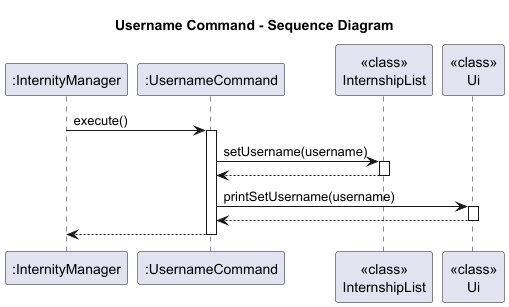
Implementation
- The
UsernameCommandis created by theCommandParserafter recognising theusernamekeyword from user input.username Jane Doe - The
UsernameCommandconstructor validates that the argument is non-null and non-blank. - When
execute()is called:- The provided username is stored via
InternshipList.setUsername(username). - The UI is updated through
Ui.printSetUsername(username)to show the change.
- The provided username is stored via
- The command does not modify any internship data and does not terminate the application.
Design Considerations
- Single Responsibility: The command only handles username updates.
- User feedback:
Ui.printSetUsername()provides clear confirmation of a successful command execution.
Dashboard feature
API: DashboardCommand.java
The Dashboard feature presents a comprehensive summary of the user’s internship tracking data, including the username, total internships, status overview and nearest deadline.
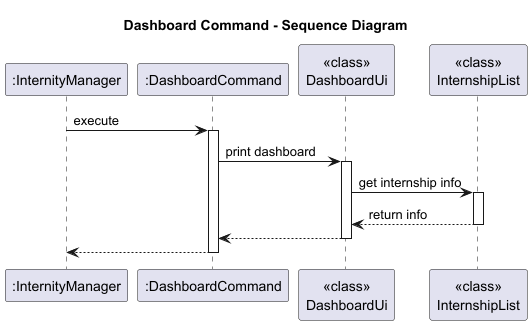
Implementation
- The
DashboardCommandserves as a simple trigger to call the UI layer.dashboard - The
DashboardUiclass handles all the logic for displaying information retrieved fromInternshipList. - Inside
DashboardUi.printDashboard(), the following occurs:- User display: Prints the current username using
InternshipList.getUsername(). - Internship count: Fetches and displays total internships via
InternshipList.size(). - Nearest deadline: Gets the upcoming internship with the nearest deadline using
InternshipList.getNearestDeadline().- Case 1: If internship with future (at least today) upcoming deadline exist, displays the internship details.
- Case 2: If no such internships exist, it displays the details of internship with the most recent past deadline and marks it as
(OVERDUE!).
- Nearest deadline count: Gets the count of internships with the same deadline as the nearest deadline internship.
- Status overview: Aggregates internship statuses into categories (Pending, Applied, etc.) and displays a summary.
- User display: Prints the current username using
- If no internships exist, a meaningful fallback message is shown (e.g. “No internships found.”).
Design Considerations
- Separation of concerns:
DashboardCommanddelegates all display logic toDashboardUi.DashboardUIdelegates all data retrieval logic toInternshipList.
- Read-only operation: The dashboard performs only data retrieval, ensuring no side effects.
- Extensibility: The
DashboardUiclass can easily be expanded to include additional statistics in the future.
Exit feature
API: ExitCommand.java
The ExitCommand allows the user to gracefully terminate the Internity application. Upon execution, it ensures that the user is notified and the main command loop in InternityManager is stopped.
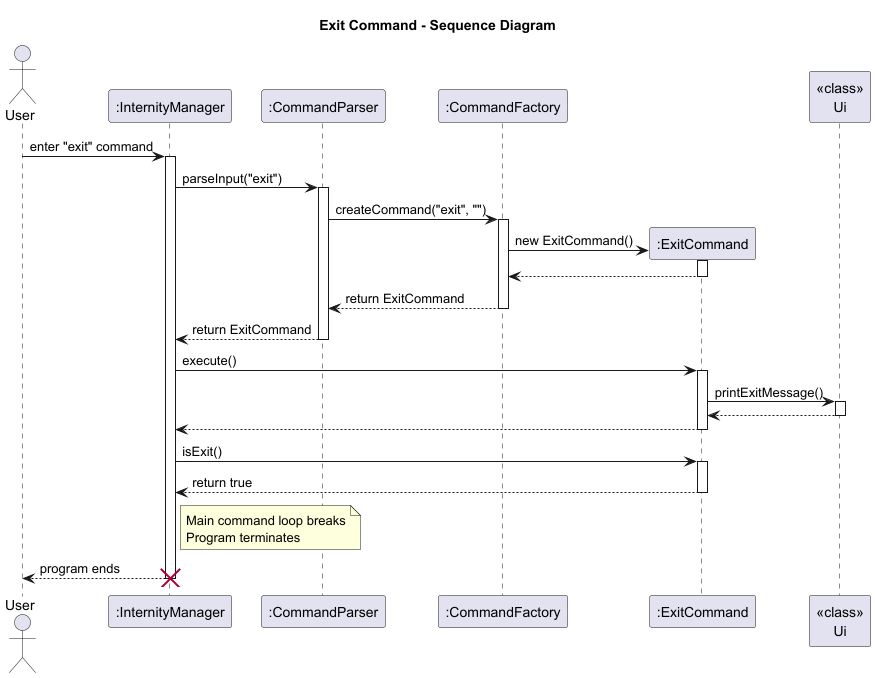
Implementation
- When the user enters
exit, theCommandParserreturns anExitCommandinstance. InternityManagercallsexecute()on the command, which triggers an interaction with theUiclass to display a friendly exit message before termination.- Since
isExit()returns true, the main loop breaks, ending the program. - ExitCommand is the only
Commandsubclass that returns true forisExit().
Help feature
API: HelpCommand.java
The HelpCommand provides a quick reference to all available commands in the Internity application.
The commands are listed in an ordered, easy-to-read format to assist navigation and usage.
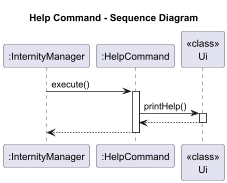
Implementation
- When the user enters
help, theCommandParserreturns aHelpCommandinstance. InternityManagercallsexecute()on the command, which invokes theUi.printHelp()method.Ui.printHelp()prints a formatted list detailing all commands.
Storage feature
API: Storage.java
The Storage feature provides persistent data storage for Internity, allowing users to save their internship data across application sessions. Without this feature, users would lose all their internship data upon closing the application. This is a critical feature that transforms Internity from a temporary session-based tool to a reliable long-term tracking system.
Implementation
The Storage mechanism uses a human-readable, pipe-delimited text file format that can be easily inspected and manually edited if needed. The implementation is split between the Storage class (which handles file I/O) and InternshipList (which coordinates the loading and saving operations).
Key components involved:
Storage- Handles all file I/O operations, parsing, validation, and formattingInternshipList.loadFromStorage()- Coordinates the loading process during application startupInternshipList.saveToStorage()- Coordinates the saving process after each commandInternityManager- Calls load on startup and auto-saves after each command executionDateFormatter- Parses date strings during loadingInternityException- Signals storage-related errors
File format specification:
Data is stored in a single file at ./data/internships.txt with both username and internships.
Username (in line below):
<username>
<company> | <role> | <DD-MM-YYYY> | <pay> | <status>
<company> | <role> | <DD-MM-YYYY> | <pay> | <status>
...
Example:
Username (in line below):
John Doe
Google | Software Engineer | 15-12-2025 | 5000 | Pending
Meta | Data Analyst | 20-01-2026 | 4500 | Applied
Amazon | Backend Developer | 10-11-2025 | 6000 | Interview
How the storage operations work
Load Operation
The load operation occurs once during application startup, before the user sees the welcome message.
Step 1. InternityManager.start() calls InternityManager.loadData() which invokes InternshipList.loadFromStorage().
Step 2. InternshipList.loadFromStorage() calls Storage.load(), which returns an ArrayList<Internship>.
Step 3. Inside Storage.load():
- Check if the file exists. If not, return an empty list (first-time users).
- Open a
BufferedReaderto read the file line by line. - Read and validate the first line (must be
"Username (in line below):"). - Read the second line as the username and call
InternshipList.setUsername(). - For each subsequent line:
- Call
parseInternshipFromFile()to parse the line. - Split the line by
"|"delimiter and trim all parts. - Validate that there are exactly 5 fields.
- Call
parseAndValidateFields()to validate each field:- Company and role must not be empty.
- Company and role contains only printable ASCII characters.
- Pay must be a valid non-negative integer.
- Status must be a valid status value (Pending/Applied/Interview/Offer/Rejected).
- Deadline must be in dd-MM-yyyy format and represent a valid date.
- If validation passes, create an
Internshipobject and add it to the list. - If validation fails, print a warning message to stderr and skip the line (graceful degradation).
- Call
Step 4. Storage.load() returns the ArrayList of successfully parsed internships.
Step 5. InternshipList.loadFromStorage() clears the static list and adds all loaded internships.
The following sequence diagram illustrates the load operation:
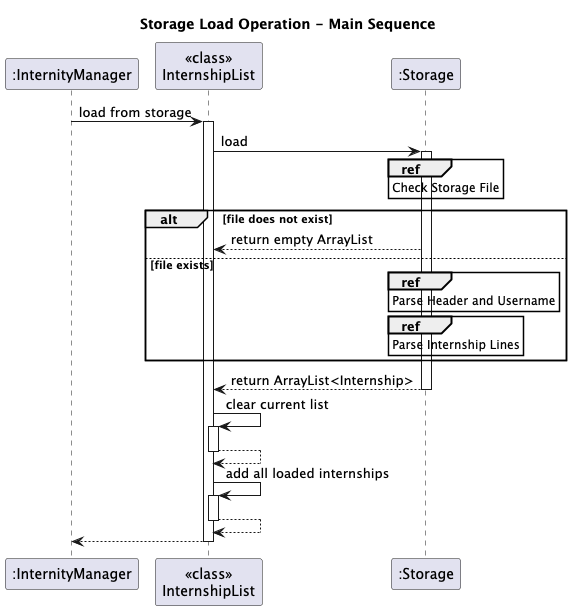
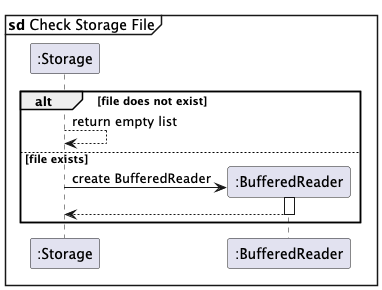
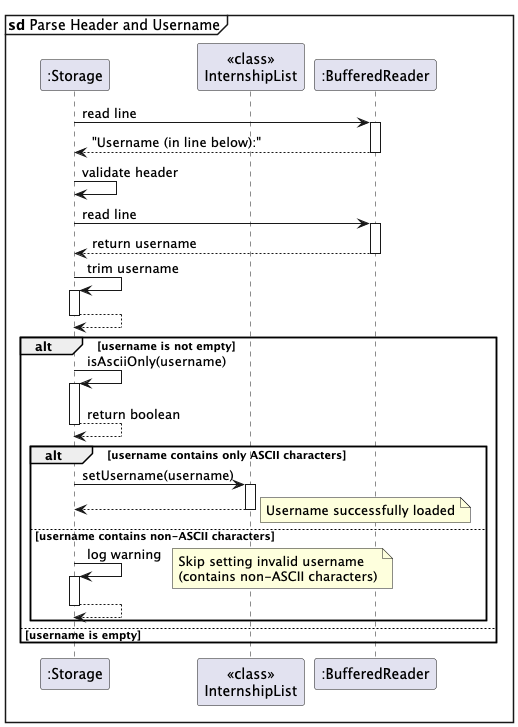
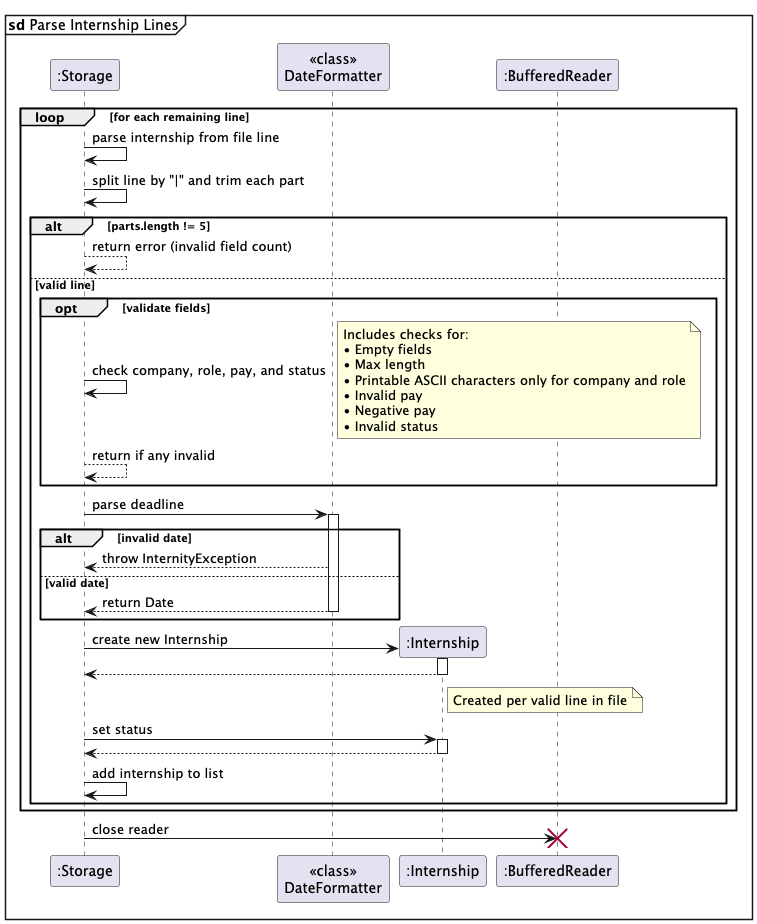
The load sequence diagram demonstrates the robust error-handling approach: corrupted lines are skipped with warnings rather than causing the entire load operation to fail. This design choice prioritizes availability over strict consistency, ensuring users can still access their valid data even if some entries are corrupted.
Save Operation
The save operation occurs automatically after every command that modifies data (add, delete, update, username).
Step 1. After a command completes execution, InternityManager calls InternityManager.saveData(), which invokes InternshipList.saveToStorage().
Step 2. InternshipList.saveToStorage() calls Storage.save(List), passing the static ArrayList.
Step 3. Inside Storage.save():
- Check if the specified parent directory exists.
- Open a
PrintWriterto write to a temporary file. - Write the username header (
"Username (in line below):"). - Retrieve and write the username via
InternshipList.getUsername(). - For each internship in the list:
- Call
formatInternshipForFile()to create the pipe-delimited string. - Retrieve company, role, deadline, pay, and status from the internship.
- Format as:
"company | role | DD-MM-YYYY | pay | status". - Write the formatted line to the file.
- Call
- Close the
PrintWriterto flush and finalize the file. - Perform an atomic move to replace the original file with the temporary file (to ensure data integrity).
- If atomic move is not supported by the filesystem, fall back to a regular move while logging a warning.
Step 4. If any IOException occurs, wrap it in an InternityException and throw it. InternityManager catches this and displays a warning (but doesn’t crash the application).
The following sequence diagram illustrates the save operation:
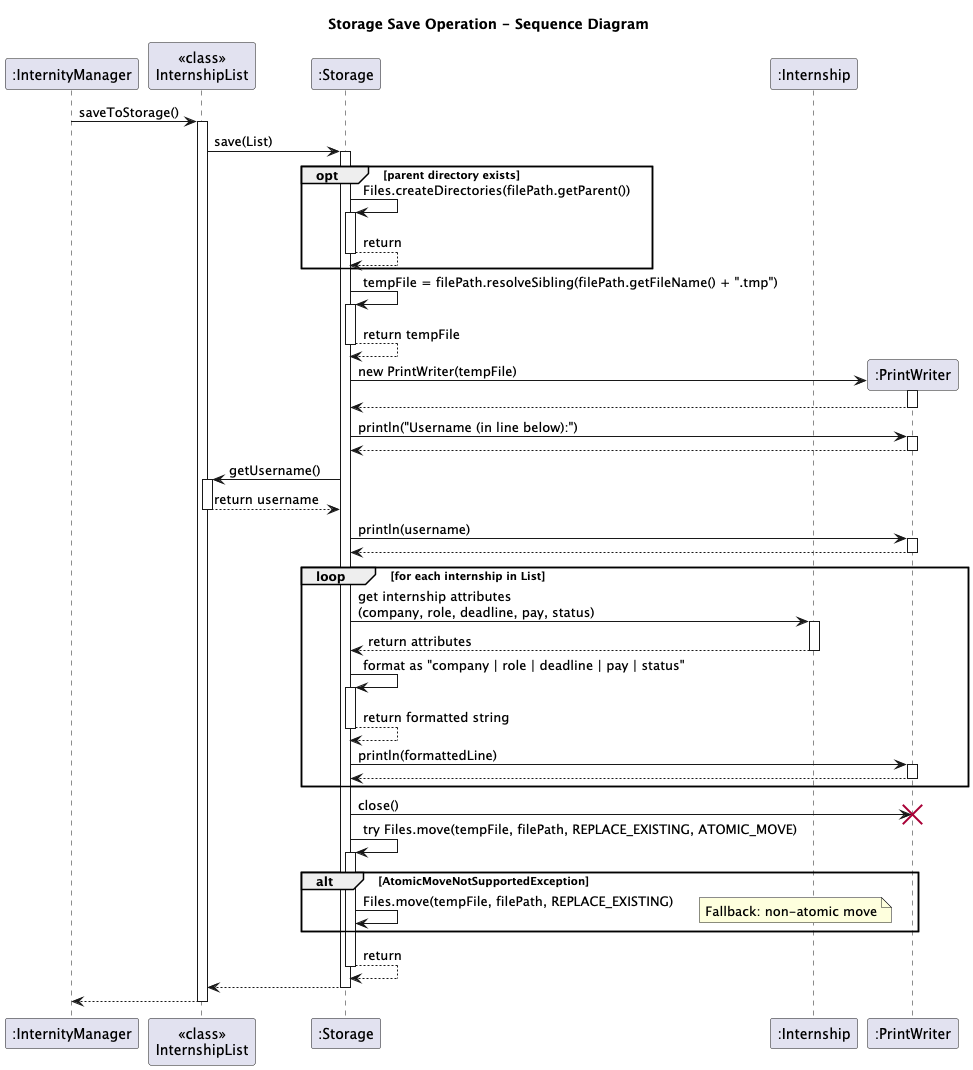
The save sequence diagram shows the straightforward serialization process. Note that the entire file is rewritten on each save operation, which is acceptable for the target use case (up to 1000 internships) but would require optimization for larger datasets.
Atomic Save Operations
To ensure data integrity during save operations, the Storage feature employs a strategy of writing to a temporary file followed by an atomic move to replace the original file. This approach minimizes the risk of data corruption in case of application crashes or interruptions during the write process.
If the atomic move fails (e.g., due to filesystem limitations), the system falls back to a standard overwrite method while logging a warning.
Design considerations
Aspect: File format choice
- Alternative 1 (current choice): Pipe-delimited text format.
- Pros: Human-readable, can be edited by a user, doubling up as an import/export function.
- Cons: No built-in schema validation.
- Alternative 2: JSON format using a library.
- Pros: Structured format with built-in validation.
- Pros: Easier to extend with new fields.
- Cons: Less human-readable due to verbose syntax.
- Alternative 3: Binary serialization using Java’s
ObjectOutputStream.- Pros: Compact file size.
- Cons: Not human-readable or editable.
- Cons: Platform-dependent binary format could cause issues.
Aspect: Error handling strategy
- Alternative 1 (current choice): Skip corrupted lines with warnings, continue loading valid entries.
- Pros: Application remains usable even with partial data corruption.
- Cons: Code complexity increases as edge cases need to be accounted for.
- Alternative 2: Fail and abort load if there is any corrupted line.
- Pros: Easy to code, no need to account for edge cases.
- Cons: Users cannot access any data if even one line is corrupted, resulting in poor user experience.
Aspect: When to save
- Alternative 1 (current choice): Auto-save after every command that modifies data.
- Pros: Minimizes data loss risk.
- Cons: Performance impact if storage is slow.
- Alternative 2: Save only on application exit.
- Pros: Fewer writes to disk.
- Cons: Risk of data loss if application crashes.
- Alternative 3: Periodic auto-save every N seconds or N operations.
- Pros: Balances performance and data safety.
- Cons: More complex implementation (requires background thread or operation counter).
Appendix: Requirements
Product scope
Target user profile
- Computer Science students who are actively applying for multiple internships, often over 200 applications per recruitment cycle.
- Detail-oriented users who want a structured way to track internship applications.
- Comfortable using command-line interfaces (CLI) and prefer a lightweight and fast tool over complex graphical applications.
Value proposition
Internity provides a centralized and efficient way to manage internship applications through a command-line interface. It allows users to:
- Store and organize internships along with key attributes such as company name, role, deadline, pay and application status
- Edit or delete existing internships to keep records accurate and up-to-date.
- Find internships quickly by searching for company or role keywords.
- Sort internships by date in ascending or descending order.
- View an automatically generated dashboard showing key statistics such as total applications, nearest deadlines and status breakdowns.
- Store internship data persistently, ensuring progress is retained between sessions.
User Stories
| Version | As a … | I want to … | So that I can … |
|---|---|---|---|
| v1.0 | new user | add a new internship with company, role, and deadline details | keep all opportunities organized in one place |
| v1.0 | user | set the status of my application (applied, interview, offer, rejected) | easily see my progress with each internship |
| v1.0 | user | see a list of all my internships | easily view the opportunities I’m tracking |
| v1.0 | user | remove an internship entry | keep the list relevant and up to date |
| v2.0 | user | update the company, role, deadline and pay for an internship | keep my application information accurate and up to date |
| v2.0 | user | see my internships sorted by deadlines | prioritize applications that are due soon |
| v2.0 | user | save and load internships automatically | avoid losing my progress and notes between sessions |
| v2.0 | user | find internships based on the company or role | easily view my applications to specific companies or positions I’m interested in |
| v2.0 | user | set or change my username | personalize my internship tracker experience |
| v2.0 | user | view a condensed dashboard | to see the current status of my applications |
| v2.0 | new user | I can view an overview of the list of commands | so that I can access the possible commands more conveniently |
Non-Functional Requirements
- Should work on any mainstream OS (Windows, macOS, Linux) as long as it has Java
17or above installed. - Should be able to hold up to 1000 internship applications without a noticeable sluggishness in performance for typical usage.
- A user with above average typing speed for regular English text (i.e. not code, not system admin commands) should be able to accomplish most of the tasks faster using commands than using the mouse.
- User data should not be shared or transmitted externally.
- All user data shall be stored locally on the user’s device.
- The architecture should allow easy addition of new commands without breaking existing functionality.
- New commands should follow a consistent Command Pattern (
execute(),isExit()). - The application shall handle invalid user inputs gracefully without crashing.
Glossary
Internship
A temporary work experience offered by a company or organization that allows a student or early-career individual
to gain practical skills, industry knowledge and professional exposure in a specific field. Internships may be paid
or unpaid, part-time or full-time, and can occur during or after academic study.
Appendix: Instructions for manual testing
Given below are instructions to test the app manually.
Adding an internship
Test case 1: Add a valid internship
- Action:
add company/Microsoft role/Intern deadline/15-12-2025 pay/5000 - Expected:
- Internship is added to the system.
- Confirmation message reflects details of the newly added internship.
Test case 2: Add an internship with missing fields
- Action:
add company/Microsoft role/Intern - Expected:
- Error message indicates invalid add command.
- Internship is not added.
Test case 3: Add an internship with invalid pay
- Action:
add company/Bay Harbour role/Butcher deadline/15-12-2025 pay/-1000 - Expected:
- Error message indicates invalid pay.
- Internship is not added.
Test case 4: Add an internship with an empty field
- Action:
add company/Uber role/ deadline/15-12-2025 pay/2000 - Expected:
- Error message indicates role field is empty.
- Internship is not added.
Updating an internship
Prerequisite: Have one internship added to the list.
Test case 1: Update a single field (company name)
- Action:
update 1 company/Apple. - Expected:
- The company field of the first internship changes to “Apple”.
- All other fields (role, deadline, pay, status) remain unchanged.
- A success message will be displayed.
Test case 2: Update multiple fields (company, role, and pay)
- Action:
update 1 company/Tesla role/ML Engineer pay/10000 - Expected:
- The internship’s company, role, and pay fields are updated to the new values.
- Deadline and status remain unchanged.
- The confirmation message indicates successful update and displays the new internship details.
Test case 3: Invalid index
- Action:
update 1000 company/Netflix - Expected:
- The command fails with the error message indicating invalid index.
- No data is modified.
Test case 4: Missing update fields
- Action: First, add an internship using
add company/Meta role/Designer deadline/05-11-2025 pay/6000.
Then, execute the commandupdate 1. - Expected:
- The command fails with an error message indicating an invalid update command.
- No changes are made to the internship.
Deleting an internship
Prerequisite: At least one internship has been added.
Test case 1: Delete an internship by index
- Action:
delete 1 - Expected:
- The internship at index 1 is removed from the list.
- Confirmation message reflects removed internship details.
Test case 2: Delete with invalid index (as there are fewer than 1000 internships in the list)
- Action:
delete 1000 - Expected:
- Error message indicates invalid internship index:
Invalid internship index: 1000 - No internship is removed.
- Error message indicates invalid internship index:
Test case 3: Delete with index 0 or negative index
- Action:
delete 0,delete -1 - Expected:
- Error message indicates invalid internship index:
Invalid internship index: 0orInvalid internship index: -1 - No internship is removed.
- Error message indicates invalid internship index:
Listing and sorting all internships
Test case 1: List all internships in the order they were added
- Action: Add several internships with varying details. Then, execute the command
list. - Expected:
- All internships are displayed in the order they were added, with their details correctly shown.
Test case 2: List all internships sorted by deadline ascending
- Action: Add several internships with varying deadlines. Then, execute the command
list sort/asc. - Expected:
- All internships are displayed sorted by their deadlines in ascending order (earliest deadline first).
Test case 3: List all internships sorted by deadline descending
- Action: Add several internships with varying deadlines. Then, execute the command
list sort/desc. - Expected:
- All internships are displayed sorted by their deadlines in descending order (latest deadline first).
Finding an internship by keyword
Prerequisites: At least one internship has been added.
Test case 1: Find by company name
- Action:
find Microsoft - Expected:
- All internships whose company name contains
Microsoft(case-insensitive) are displayed. - Each matching internship shows all details.
- All internships whose company name contains
Test case 2: Find by role name
- Action:
find Intern - Expected:
- All internships whose role contains
Intern(case-insensitive) are displayed. - Each matching internship shows all details.
- All internships whose role contains
Changing username
Prerequisites: The application has been launched and the user is at the command prompt.
Test case 1: Changing username I
- Action:
username Dexter - Expected:
- Username is updated to “Dexter”.
- Confirmation message reflects the new username:
Username set to Dexter.
Test case 2: Changing username II
- Action:
username Dexter <3 Nicole - Expected:
- Username is updated to “Dexter <3 Nicole”.
- Confirmation message reflects the new username:
Username set to Dexter <3 Nicole.
Test case 3: Invalid username input
- Action:
username(without specifying a name) - Expected:
- Error message is displayed indicating an invalid username command.
- Username remains unchanged.
Displaying the Internity Dashboard
Test case 1: Display dashboard with multiple internships
- Action: Add internships, then
dashboard - Expected:
- Dashboard shows the current username.
- Total internships are displayed.
- Nearest upcoming internship deadline is displayed.
- Status overview counts for each status category are shown.
Test case 2: Display dashboard with no internships
- Action:
dashboard - Expected:
- Dashboard stills shows the current username.
- Dashboard indicates no internships are found.
Test case 3: Display dashboard after changing username
- Action:
username Doakes, thendashboard - Expected:
- Dashboard displays the new username
Doakes.
- Dashboard displays the new username
Test case 4: Dashboard reflects recent changes
- Action: Add, update, or delete internships, then
dashboard - Expected:
- Dashboard reflects the updated internship count, deadlines and statuses.
Test case 5: Nearest deadline is overdue
- Action: Add only internships with deadlines in the past, then
dashboard - Expected:
- Dashboard shows the nearest deadline internship marked as
(OVERDUE!).
- Dashboard shows the nearest deadline internship marked as
Test case 6: Multiple internships with the same nearest deadline
- Action: Add multiple internships with the same nearest deadline (e.g. the date today), then
dashboard - Expected:
- Dashboard shows the nearest deadline internship and indicates the count of other internships with that deadline.
Saving Data
Prerequisites:
- The application has been launched at least once.
- At least one internship has been added, updated or deleted.
Test case 1: Save after adding internships
- Action: Add one or more internships, then exit the program.
- Expected:
- Internships are written to the data file.
- When program is restarted, all added and valid internships are loaded correctly.
Test case 2: Save after updating an internship
- Action: Update one or more internships, then exit the program.
- Expected:
- Changes to internships are saved to the storage file.
- After restarting, updated details are correctly loaded.
Test case 3: Save after deleting an internship
- Action: Delete one or more internships, then exit the program.
- Expected:
- Deleted internships are removed from the storage file.
- After restarting, deleted internships do not appear.